Chapter 5: Custom Taxonomies
In this chapter, we explore how to enhance your WordPress site by introducing custom taxonomies. Taxonomies provide a way to group posts and custom post types together based on shared characteristics. While WordPress comes with built-in taxonomies like Categories and Tags, building your own enables robust filtering, enhanced SEO, and better content structure—perfect for complex sites like a coffee shop catalog.
A custom taxonomy is a classification system you define to group your content. For example, on a specialized coffee site, you may want to categorize both Coffees Products and Coffee Origins by shared attributes such as region or processing method.
Why Create Custom Taxonomies?
Custom taxonomies allow you to:
- Allow users to filter and find content easily.
- Improve backend organization for admins and editors.
- Generate SEO-friendly archive pages for important attributes.
- Link different post types together
Register Custom Taxonomies
With Chisel theme you can register custom taxonomies in an easy and quick way. Simply use chisel_custom_taxonomies filter hook in custom/app/WP/CustomPostTypes.php file where you registered a custom post type. We will register the custom taxonomies that will be shared between Coffee Origin and Products. We will use them later to create our custom filtering:
1. Register the filter and a attach a callback:
/**
 * Register filter hooks.
 */
public function filter_hooks(): void {
  add_filter( 'chisel_custom_post_types', array( $this, 'register_custom_post_types' ) );
	add_filter( 'chisel_custom_taxonomies', array( $this, 'register_custom_taxonomies' ) );
}
/**
* Register custom taxonomies.
*
* @param array $taxonomies The taxonomies.
*
* @return array
*/
public function register_custom_taxonomies( $taxonomies) {
$taxonomies['coffee-region'] = array(
'singular' => __( 'Coffee Region', 'chisel' ),
'plural' => __( 'Coffee Regions', 'chisel' ),
'post_types' => array( 'coffee-origin', 'product' ),
'public' => false,
'show_ui' => true,
'show_in_menu' => true,
'hierarchical' => true,
'rewrite' => array(
'slug' => 'coffee-region',
),
);
$taxonomies['processing-method'] = array(
'singular' => __( 'Processing Method', 'chisel' ),
'plural' => __( 'Processing Methods', 'chisel' ),
'post_types' => array( 'coffee-origin', 'product' ),
'public' => false,
'show_ui' => true,
'show_in_menu' => true,
'hierarchical' => true,
'rewrite' => array(
'slug' => 'processing-method',
),
);
$taxonomies['certification'] = array(
'singular' => __( 'Certification', 'chisel' ),
'plural' => __( 'Certifications', 'chisel' ),
'post_types' => array( 'coffee-origin', 'product' ),
'public' => false,
'show_ui' => true,
'show_in_menu' => true,
'hierarchical' => true,
'rewrite' => array(
'slug' => 'certification',
),
);
return $taxonomies;
}Flush Rewrite Rules
After adding the Custom Taxonomies code:
- Go to Settings > Permalinks in WordPress admin.
- Click Save Changes (no need to change anything).
- This flushes the rewrite rules and activates your new post type URLs.
Create Terms
Now let’s create some sample taxonomy terms:
- Go to Products or Coffee Origins > Regions.
- Add the following terms:
Coffee Regions
- Africa
- Asia & Pacific
- Caribbean
- Central America
- South America
Processing Methods
- Anaerobic Fermentation
- Honey Processed
- Natural
- Washed
- Wet-Hulled
Certifications
- Direct Trade
- Fair Trade
- Organic
- Rainforest Alliance
Display terms
Before we display our custom terms, let’s modify the get_details() method in ChiselCoffeeOrigin class, to include the terms into the details list
/**
 * Prepare the origin details for twig
 *
 * @return array
 */
public function get_details(): array {
	$fields  = array(
		'altitude',
		'farm',
		'harvest_season',
		'cupping_score',
	);
	$details = array();

	foreach ( $fields as $field ) {
		$details[ $field ] = array(
			'label' => ucfirst( str_replace( '_', ' ', $field ) ),
			'value' => $this->meta( $field ),
		);
	}

	$custom_attributes = array(
		'coffee-region'     => 'Region',
		'processing-method' => 'Processing Method',
		'certification'     => 'Certification',
	);

	$attributes = array();

	foreach ( $custom_attributes as $taxonomy => $label ) {
		$terms = $this->terms( $taxonomy );

		if ( ! empty( $terms ) ) {
			$attributes[] = array(
				'label' => $label,
				'value' => implode( ', ', wp_list_pluck( $terms, 'name' ) ),
			);
		}
	}

	$details = array_merge( $attributes, $details );

	return $details;
}Display related products
Thanks to sharing our custom taxonomies betwee Coffee Origin posts and Products we can, after assigning the terms to both post types, dynamically display related products in single-coffee-origin.twig
- Create another custom method in
ChiselCoffeeOriginclass. We’ll also store the results in a custom variable to use the request caching for better performance. This way, repeated calls to the same method within a single request will use the cached results and avoid redundant queries, improving your site’s performance.
/**
 * Related products.
 *
 * @var ?array
 */
public ?array $related_products = null;

/**
 * Get related products by region
 *
 * @return array
 */
public function get_related_products(): array {
	if ( $this->related_products !== null ) {
		return $this->related_products;
	}

	$this->related_products = array();

	$regions = $this->terms(
		array(
			'taxonomy' => 'coffee-region',
			'fields'   => 'ids',
		)
	);

	if ( ! empty( $regions ) ) {
		$products = Timber::get_posts(
			array(
				'post_type'      => 'product',
				'post_status'    => 'publish',
				'posts_per_page' => 3,
				'tax_query'      => array( // phpcs:ignore
					array(
						'taxonomy' => 'coffee-region',
						'field'    => 'id',
						'terms'    => $regions,
					),
				),
				'no_found_rows'  => true,
			)
		);

		$this->related_products = $products->to_array();
	}

	return $this->related_products;
}- Now let’s update
single-coffee-origin.twigto display the related products
{% extends "single.twig" %}

{% block the_title %}{% endblock %}

{% block inner_content %}
  {% if post.get_thumbnail('full', {class: 'wp-block-cover__image-background'}) %}
    {% include "components/origin-hero.twig" with {title: post.title, image: post.get_thumbnail()} %}
  {% endif %}

  {% include "components/origin-details.twig" %}

  {{ post.content }}

  {% if post.get_related_products() %}
    <div class="c-origin-related-products">
      {% include 'woocommerce/linked-products.twig' with {linked_title: __('Coffees from this region:', 'chisel'), linked_products: post.get_related_products(), linked_type: 'related'} %}
    </div>
  {% endif %}
{% endblock %}Preview
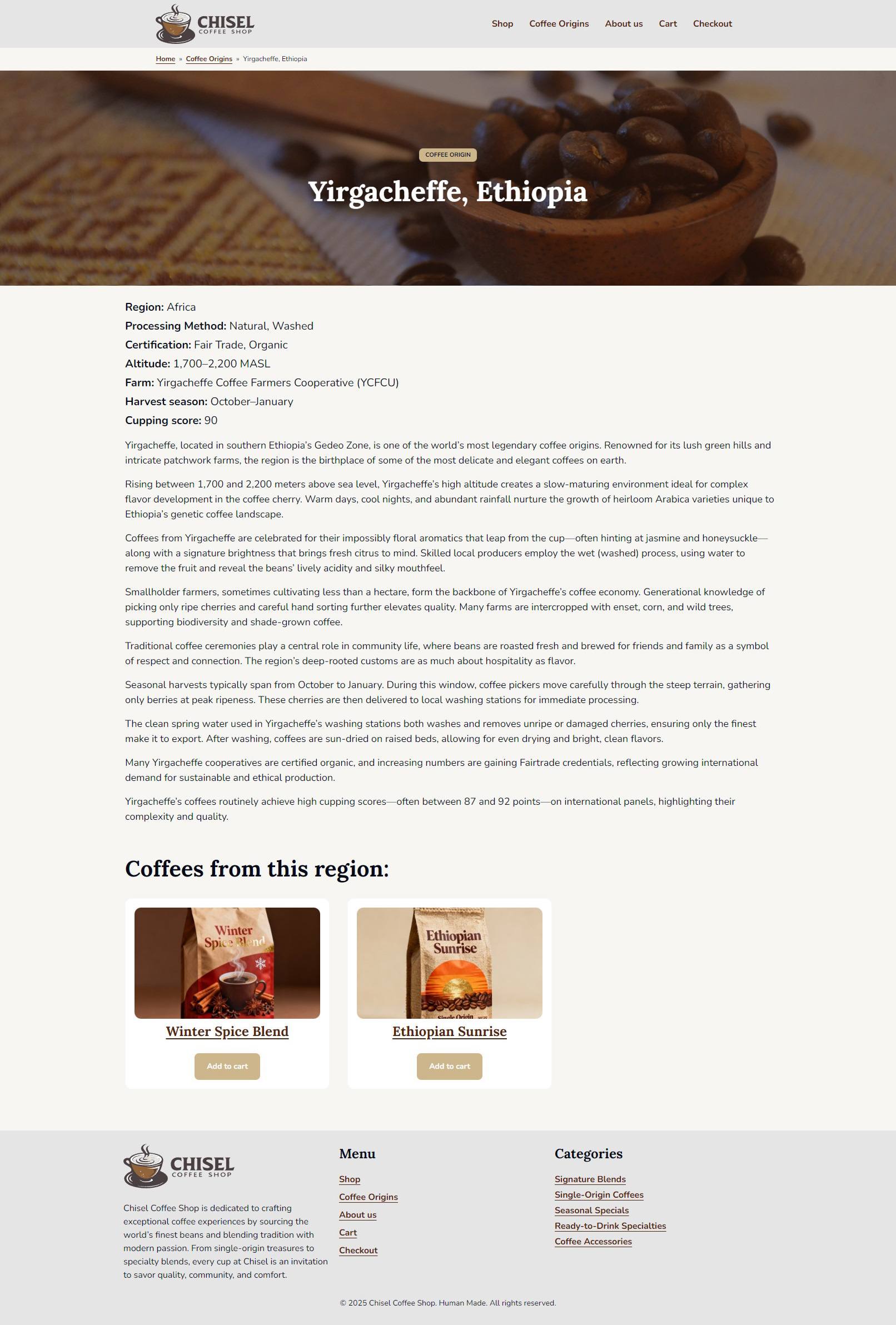
Here’s what the Coffee Origin example should look like now.