Chapter 6: Custom AJAX filters
As your catalog grows, visitors expect quick, seamless filtering for products and origins. AJAX lets you fetch and display filtered results instantly, without a full page reload, creating a modern and smooth customer experience. In Chisel we use REST API for custom AJAX Request.
In this section I’ll show you how easy it is to create a custom AJAX endpoint and call it with a built in utility functions.
Planning AJAX Filtering
For our website we will use AJAX custom filters on Products and Coffee Origin archive pages. We will build the following filters:
- Coffee Region
- Processing Method
- Certification
- Products Category (for products only)
Steps
Create filters component
Let’s create the posts-filters.twig component in views/components with the following content:
<div class="c-posts-filters js-posts-filters" data-post-type="{{ post_type }}" data-per-page="{{ load_more|default(10) }}">
  <h3 class="c-posts-filters__title">{{ filter_title|default('Filters') }}</h3>
  <ul class="c-posts-filters__list">
    <form action="">
  {% for type, title in get_filter_types(post_type, exclude_types|default(null), include_types|default(null)) %}
    {% set filter_data = get_filter_data(type) %}

    {% if filter_data %}
      {% for item in filter_data %}
        <li class="c-posts-filters__item js-posts-filter-type" data-type="{{ type }}">
          <h4 class="c-posts-filters__item-title">{{ title }}</h4>

          <div class="c-posts-filters__item-choices">
            {% for choice in item.choices %}
              <div class="c-posts-filters__item-choice">
                <input type="checkbox" name="filter[{{ type }}][]" value="{{ choice.value }}" id="filter-{{ type }}-{{ choice.value }}" class="js-filter-choice">
                <label for="filter-{{ type }}-{{ choice.value }}">{{ choice.text }}</label>
              </div>
            {% endfor %}
          </div>
        </li>
      {% endfor %}
    {% endif %}
  {% endfor %}

    </form>
  </ul>
</div>Create custom helper class
Let’s create a custom FiltersHelpers class in custom/app/Helpers/FiltersHelpers.php
<?php

namespace Chisel\Helpers\Custom;

use Timber\Timber;

/**
 * Helper functions.
 *
 * @package Chisel
 */
final class FiltersHelpers {
	/**
	 * Get filter types.
	 *
	 * @param string $post_type
	 * @param ?array $exclude_types
	 * @param ?array $include_types
	 *
	 * @return array
	 */
	public static function get_filter_types( string $post_type, ?array $exclude_types = null, ?array $include_types = null ): array {
		if ( ! empty( $include_types ) ) {
			return $include_types;
		}

		$types = array(
			'coffee-region'     => 'Coffee Region',
			'processing-method' => 'Processing Method',
			'certification'     => 'Certification',
		);

		if ( $post_type === 'product' ) {
			$types = array_merge(
				$types,
				array(
					'product_cat'    => 'Product Category',
					'brewing-method' => 'Brewing Method',
					'roast-level'    => 'Roast Level',
				)
			);
		}

		if ( ! empty( $exclude_types ) ) {
			$types = array_diff( $types, $exclude_types );
		}

		return $types;
	}

	/**
	 * Get filter data by type.
	 *
	 * @param string $type
	 *
	 * @return array
	 */
	public static function get_filter_data( string $type ): array {
		$data = array();

		switch ( $type ) {
			default:
				$terms = Timber::get_terms(
					array(
						'taxonomy' => $type,
					)
				);

				$type_terms = array();

				if ( $terms ) {
					foreach ( $terms as $term ) {
						$type_terms[] = array(
							'value' => $term->slug,
							'text'  => $term->name,
						);
					}
				}

				if ( $type_terms ) {
					$data[] = array(
						'type'    => $type,
						'choices' => $type_terms,
					);
				}
				break;
		}

		return $data;
	}

	/**
	 * Get filters query args.
	 *
	 * @param array $filters_values
	 *
	 * @return array
	 */
	public static function get_filters_query_args( array $filters_values ): array {
		$args = array();

		if ( empty( $filters_values ) ) {
			return $args;
		}

		$args = array(
			'tax_query' => array( // phpcs:ignore
				'relation' => 'AND',
			),
		);

		foreach ( $filters_values as $type => $values ) {
			$args['tax_query'][] = array(
				'taxonomy' => $type,
				'field'    => 'slug',
				'terms'    => $values,
			);
		}

		return $args;
	}
}The methods we create are:
get_filter_types– This method will provide a list of filters based on the post type in the format: taxonomy => labelget_filter_data– Retrieves terms for given taxonomy (filter type)get_filters_query_args– This method generates a tax_query array to use in the posts query later in our AJAX endpoint
Register helpers in Twig
- In order to use our first two helper methods in Twig as we do in
posts-filters.twigfile we need to pass them to Twig using a chisel filter hookchisel_twig_register_functionsincustom/app/WP/Twig.php
/**
 * Register action hooks.
 */
public function action_hooks(): void {
	add_action( 'chisel_twig_register_functions', array( $this, 'register_functions' ), 10, 2 );
}

/**
 * Register custom Twig functions.
 *
 * @param \Twig\Environment $twig The Twig environment.
 * @return \Twig\Environment
 */
public function register_functions( \Twig\Environment $twig ): \Twig\Environment {
	$chisel_twig->register_function( $twig, 'get_filter_types', array( $this, 'get_filter_types' ) );
	$chisel_twig->register_function( $twig, 'get_filter_data', array( $this, 'get_filter_data' ) );

	return $twig;
}- Now let’s add callback methods and use our helper methods:
- Remember to add
use Chisel\Helpers\Custom\FiltersHelpers;at the top of the file.
/**
 * Get filter types.
 *
 * @param string $post_type
 * @param ?array $exclude_types
 * @param ?array $include_types
 *
 * @return array
 */
public function get_filter_types( string $post_type, ?array $exclude_types = null, ?array $include_types = null ): array {
	return FiltersHelpers::get_filter_types( $post_type, $exclude_types, $include_types );
}

/**
 * Get filter data by type.
 *
 * @param string $type
 *
 * @return array
 */
public function get_filter_data( string $type ): array {
	return FiltersHelpers::get_filter_data( $type );
}Add filters to sidebar
We’d like to display our custom filters in the sidebar on Coffee Origin and Products archive pages. We are not going to use a sidebar widget though, but will inject our custom filters component into the sidebar content. This way the sidebar will treat it as if we used a widget and will adjust the page layout accordingly.
- We will use
chisel_sidebar_contentfilter to achieve the desired result. Incustom/app/WP/Theme.phplet’s add:
public function filter_hooks(): void {
  // other hooks here
  add_filter( 'chisel_sidebar_content', array( $this, 'sidebar_filters' ), 99, 2 );
}- And a custom callback
/**
 * Add filters to sidebars.
 *
 * @param string $content
 * @param string $sidebar_name
 *
 * @return string
 */
public function sidebar_filters( string $content, string $sidebar_name ): string {
	global $post_type;

	if (
		( $sidebar_name === 'chisel-sidebar-woocommerce' && is_shop() ) ||
		( $sidebar_name === 'chisel-sidebar-coffee-origin' && is_post_type_archive( 'coffee-origin' ) )
	) {
		$content = Timber::compile(
			'components/posts-filters.twig',
			array(
				'post_type' => $post_type,
			)
		) . $content;
	}

	return $content;
}Adjust Archive pages
Before we create our Javascript class and a custom AJAX endpoint let’s prepare the archive pages with custom classes, so that we can properly reload the posts lists as well as display a loading indicator.
- Add custom css class:
js-posts-containertoviews/woocommerce/archive.product.twig
<div class="o-layout">
    <div class="{{ bem('o-layout__item', (sidebar.content ? '8' : '12') ~ '-large') }}">
      <div class="c-posts-items c-shop-items {{ loop_columns_class }} js-load-more-container js-posts-container">
      {% if items is not empty %}
{% for item in items %}- Add custom css class:
js-posts-containertoviews/index.twig
<div class="o-layout">
      <div class="{{ bem('o-layout__item', (sidebar.content ? '8' : '12') ~ '-large') }}">
        <div class="c-posts-items {{ bem('o-grid', 'cols-1', 'cols-2-small', (sidebar.content ? 'cols-2' : 'cols-3') ~ '-medium') }} js-load-more-container js-posts-container">
          {% if posts is not empty %}
{% for post in posts %}Add custom styles
Add custom styles for our filters component – create _posts-filters.scss in src/styles/components
@use '~design' as *;

.c-posts-filters,
.c-posts-items {
  position: relative;

  &.is-loading {
    &::after {
      position: absolute;
      inset: 0;
      z-index: 99;
      content: '';
      background-color: rgba-color('white', 90%);
      border-radius: get-border-radius('small');
      animation: pulse 2s ease-in-out infinite;
    }
  }
}

@keyframes pulse {
  0%,
  100% {
    opacity: 0.3;
  }

  50% {
    opacity: 0.7;
  }
}

.c-posts-filters__list {
  padding: 0;
  margin: 0;
  list-style-type: none;
}

.c-posts-filters__item {
  margin: 0 0 get-margin('medium');
}

.c-posts-filters__item-choice {
  margin-bottom: get-margin('tiny');

  label {
    margin: 0 0 0 get-margin('tiny');
  }
}Create Javascript class to handle the filtering.
Let’s create a custom JavaScript class to manage our filters and send requests to the server.
Thanks to Chisel’s built-in ajaxRequest utility, we only need to focus on writing functions that collect the filter data — the utility takes care of all the heavy AJAX work for us.
import Utils from './utils';

class PostsFilters {
  constructor() {
    this.initSelectors();
    this.initElements();

    if (!this.elements.filters) {
      return;
    }

    this.initClassnames();
    this.initState();

    this.init();
  }

  initState() {
    const { postType, perPage } = this.elements.filters.dataset;

    this.state = {
      page: 1,
      loading: false,
      postType,
      perPage,
      filterTypes: this.getFilterTypes(),
      filters: {},
    };
  }

  setState(newState) {
    this.state = {
      ...this.state,
      ...newState,
    };
  }

  initSelectors() {
    this.selectors = {
      container: '.js-posts-container',
      filters: '.js-posts-filters',
      filterType: '.js-posts-filter-type',
    };
  }

  initElements() {
    this.elements = {
      container: document.querySelector(this.selectors.container),
      filters: document.querySelector(this.selectors.filters),
    };

    if (!this.elements.filters) {
      return;
    }

    this.elements = {
      ...this.elements,
      form: this.elements.filters.querySelector('form'),
      choices: this.elements.filters.querySelectorAll('.js-filter-choice'),
      filterTypes: this.elements.filters.querySelectorAll(this.selectors.filterType),
    };
  }

  initClassnames() {
    this.classnames = {
      loading: 'is-loading',
    };
  }

  init() {
    this.bindEvents();
  }

  getFilterTypes() {
    return Array.from(this.elements.filterTypes).map((filterType) => {
      return filterType.dataset.type;
    });
  }

  bindEvents() {
    this.elements.form.addEventListener('submit', (e) => this.formSubmitHandler(e));

    this.elements.choices.forEach((choice) => {
      choice.addEventListener('change', () => this.elements.form.requestSubmit());
    });
  }

  formSubmitHandler(e) {
    e.preventDefault();

    const formData = new FormData(this.elements.form);

    this.state.filterTypes.forEach((filterType) => {
      const values = formData.getAll(`filter[${filterType}][]`) || [];

      if (values.length) {
        this.state.filters[filterType] = formData.getAll(`filter[${filterType}][]`);
      } else {
        delete this.state.filters[filterType];
      }
    });

    this.filterPosts();
  }

  filterPosts() {
    if (this.state.loading) {
      return;
    }

    const event = new CustomEvent('beforeFilterPosts', {
      detail: {
        filters: this.state.filters,
      },
    });
    document.dispatchEvent(event);

    Utils.ajaxRequest('filter-posts', {
      ...this.state,
    }).then((response) => {
      this.unsetLoadingState();
      this.elements.container.innerHTML = response.data;
    });

    this.setLoadingState();
  }

  setLoadingState() {
    this.setState({ loading: true });
    this.elements.container.classList.add(this.classnames.loading);
    this.elements.filters.classList.add(this.classnames.loading);
  }

  unsetLoadingState() {
    this.setState({ loading: false });
    this.elements.container.classList.remove(this.classnames.loading);
    this.elements.filters.classList.remove(this.classnames.loading);
  }
}

export default PostsFilters;Initialize the PostsFilters class in app.js:
import PostsFilters from './modules/posts-filters';
new PostsFilters();I also included the custom event: beforeFilterPosts, that we could listen to in our LoadMore class if we have more posts on the website. That way the load more feature will take filters into account when retrieving posts. We will not cover that in this tutorial though.
Create custom AJAX endpoint
Creating custom AJAX endpoint is very easy using the filter hook chisel_ajax_routes . Then you need to create a custom enpoint class to handle the request:
- Register the endpoint – add your custom endpoint in
custom/app/WP/Ajax.phpto routes array:
/**
 * Register filter hooks.
 */
public function filter_hooks(): void {
	add_filter( 'chisel_ajax_routes', array( $this, 'register_ajax_routes' ) );
}

/**
 * Register custom ajax routes.
 *
 * @param array $routes The ajax routes.
 *
 * @return array
 */
public function register_ajax_routes( array $routes ): array {
	$routes['filter-posts'] = array();

	return $routes;
}The AjaxController will look for our endpoint class based on the endpoint we registered. In our case it will be FilterPostsEndpoint
- Create custom class in
custom/app/Ajax/with a requiredFilterPostsEndpoint.phphandlemethod
<?php

namespace Chisel\Ajax\Custom;

use Chisel\Interfaces\AjaxEndpointInterface;
use Chisel\Traits\Rest;
use Timber\Timber;
use Chisel\Helpers\CacheHelpers;
use Chisel\Helpers\AjaxHelpers;
use Chisel\Helpers\Custom\FiltersHelpers;

/**
 * Load more endpoint.
 *
 * @package Chisel
 */
final class FilterPostsEndpoint implements AjaxEndpointInterface {
	use Rest;

	/**
	 * Ajax call for load more posts feature.
	 *
	 * @param \WP_REST_Request $request WP_REST_Request.
	 *
	 * @return \WP_REST_Response
	 */
	public function handle( \WP_REST_Request $request ): \WP_REST_Response {
		if ( ! $request ) {
  		return $this->error( 'No request data' );
  	}

  	$data = $this->get_data( $request );

  	$post_type = isset( $data['postType'] ) ? sanitize_text_field( $data['postType'] ) : 'post';
  	$per_page  = isset( $data['perPage'] ) ? absint( $data['perPage'] ) : 10;
  	$page      = isset( $data['page'] ) ? absint( $data['page'] ) : 1;
  	$filters   = isset( $data['filters'] ) ? AjaxHelpers::ajax_json_decode( $data['filters'] ) : array();

  	$response = '';

  	$args = array(
  		'post_type'      => $post_type,
  		'posts_per_page' => $per_page,
  		'paged'          => $page,
  	);

  	if ( $post_type === 'product' ) {
  		$args['orderby'] = get_option( 'woocommerce_default_catalog_orderby', 'menu_order' );
  	}

  	$filters_args = FiltersHelpers::get_filters_query_args( $filters );

  	if ( ! empty( $filters_args ) ) {
  		$args = array_merge( $args, $filters_args );
  	}

  	$posts = Timber::get_posts( $args )->to_array();

  	$templates = array( 'components/' . $post_type . '-item.twig', 'components/post-item.twig' );

  	if ( $post_type === 'product' ) {
  		array_unshift( $templates, 'woocommerce/content-product.twig' );
  	}

  	if ( ! empty( $posts ) ) {
  		foreach ( $posts as $post ) {
  			$response .= Timber::compile( $templates, array( 'post' => $post ), CacheHelpers::expiry() );
  		}
  	} else {
  		$response = Timber::compile( 'components/no-results.twig' );
  	}

  	return $this->success( $response );
	}
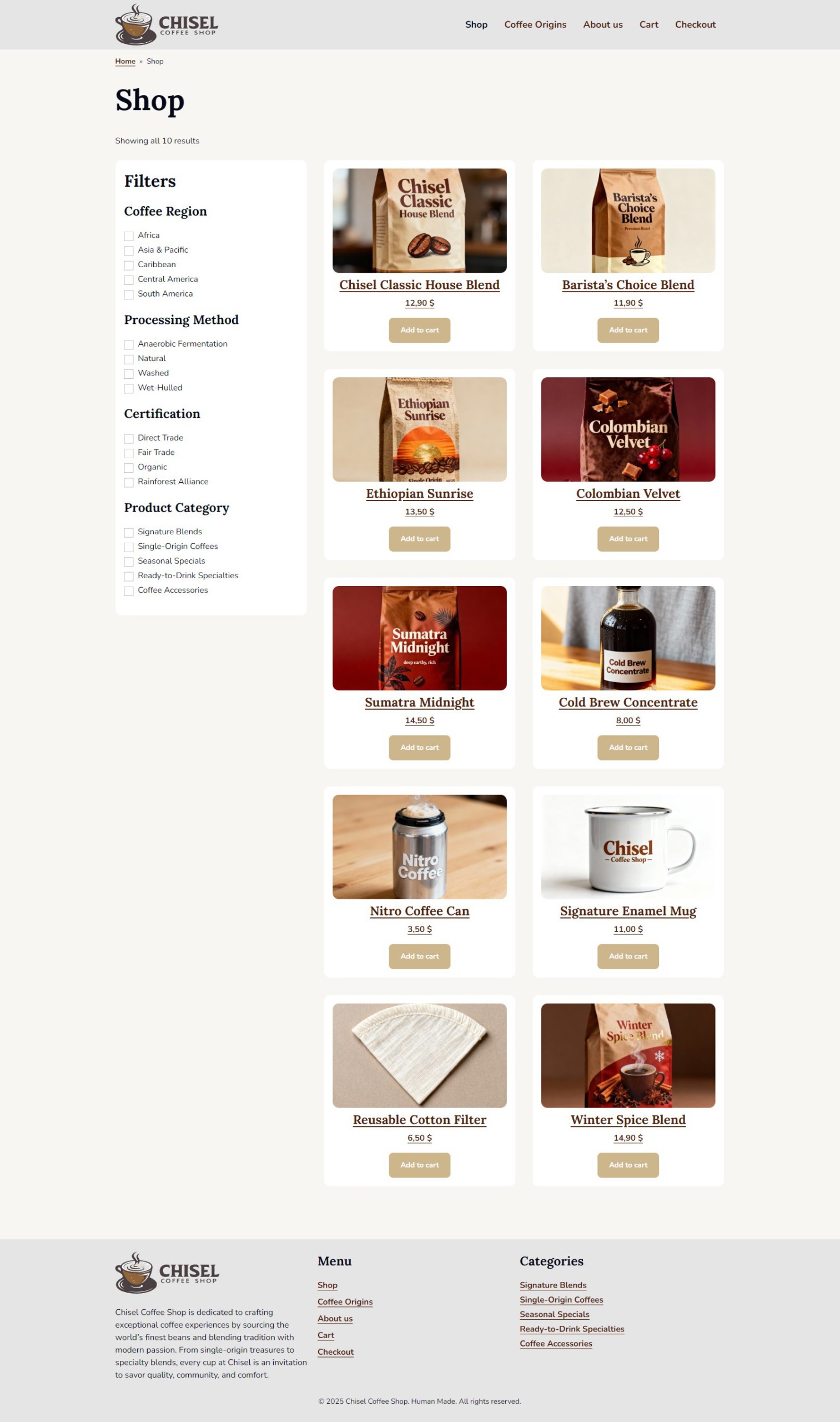
}Preview
Here’s what the example Products page should look like