Chapter 4: Custom Post Type: Coffee Origin
Custom Post Types (CPTs) allow you to create specialized content that doesn’t fit the standard “Posts” or “Pages” format. For the Chisel Coffee Shop theme, we’ll create a Coffee Origin custom post type to showcase information about the regions where our coffee beans are sourced—adding educational value and storytelling to your site.
Why Create a Coffee Origin Post Type?
A Coffee Origin CPT allows you to:
- Educate customers about coffee-growing regions (Ethiopia, Colombia, Sumatra, etc.)
- Build brand storytelling around sourcing and sustainability
- Create rich content with custom fields (altitude, processing method, flavor profile)
- Link origins to products for a more connected shopping experience
Register the Coffee Origin Custom Post Type
With Chisel theme you can register custom post types using the chisel_custom_post_types filter. Simply add it in this way:
1. Register the filter and a attach a callback in custom/app/WP/CustomPostTypes.php:
/**
 * Register filter hooks.
 */
public function filter_hooks(): void {
	add_filter( 'chisel_custom_post_types', array( $this, 'register_custom_post_types' ) );
}2. Create the callback method
/**
 * Register custom post types.
 *
 * @param array $post_types The post types.
 *
 * @return array
 */
public function register_custom_post_types( $post_types ) {
	$post_types['coffee-origin'] = array(
		'singular'      => __( 'Coffee Origin', 'chisel' ),
		'plural'        => __( 'Coffee Origins', 'chisel' ),
		'supports'      => array( 'editor', 'thumbnail', 'excerpt' ),
		'menu_icon'     => 'dashicons-coffee',
		'public'        => true,
		'menu_position' => 20,
		'rewrite'       => array(
			'slug' => 'coffee-origin',
		),
	);

	return $post_types;
}Flush Rewrite Rules
After adding the CPT code:
- Go to Settings > Permalinks in WordPress admin.
- Click Save Changes (no need to change anything).
- This flushes the rewrite rules and activates your new post type URLs.
Extending Coffee Origin with Custom Class
Now, we’ll extend the functionality by creating a custom class for Coffee Origin posts. This follows the same pattern as ChiselPost and allows us to add custom methods and properties specific to coffee origins.
Why Create a Custom Class?
A custom class for Coffee Origin posts allows you to:
- Encapsulate logic specific to coffee origins
- Add custom methods for retrieving and formatting origin data
- Keep templates clean by moving PHP logic into the class
- Maintain consistency with Chisel theme architecture
- Extend functionality easily as your project grows
Create the CoffeeOrigin Class
Create a new file: custom/app/Timber/ChiselCoffeeOrigin.php
<?php

namespace Chisel\Timber\Custom;

use Timber\Post as TimberPost;
use Timber\Timber;
use Chisel\Helpers\ImageHelpers;

/**
 * Extend Timber Post class with custom functionality.
 *
 * @package Chisel
 */
class ChiselCoffeeOrigin extends TimberPost {

	/**
	 * Post thumbnail.
	 *
	 * @var ?string
	 */
	public ?string $thumbnail_html = null;

	/**
	 * Get the post thumbnail. Returns the thumbnail responsive image html.
	 *
	 * @param string $size Thumbnail size.
	 * @param array  $attrs Image attributes.
	 *
	 * @return string Responsive <img> HTML, or empty string.
	 */
	public function get_thumbnail( string $size = 'medium', array $attrs = array() ): string {
		if ( $this->thumbnail_html === null ) {
			$this->thumbnail_html = '';

			if ( has_post_thumbnail( $this->ID ) ) {
				$thumbnail_id         = get_post_thumbnail_id( $this->ID );
				$this->thumbnail_html = ImageHelpers::get_responsive_image( $thumbnail_id, $size, $attrs );
			}
		}

		return $this->thumbnail_html;
	}
}We’ll add some more custom methods later.
Register the Custom Class
Now we need to tell WordPress/Timber to use our custom CoffeeOrigin class for coffee_origin posts.
Add this to custom/app/WP/Site.php - post_classmap method:
public function post_classmap( array $classmap ): array {
		$custom_classmap = array(
			'coffee-origin' => ChiselCoffeeOrigin::class,
		);

		return array_merge( $classmap, $custom_classmap );
}Create Twig Template for Single Coffee Origin
Create: views/single-coffee-origin.twig
{% extends "single.twig" %}

{% block the_title %}{% endblock %}

{% block inner_content %}
  {{ post.content }}
{% endblock %}This will disable the display of default post title as we will use a custom hero section to display the title.
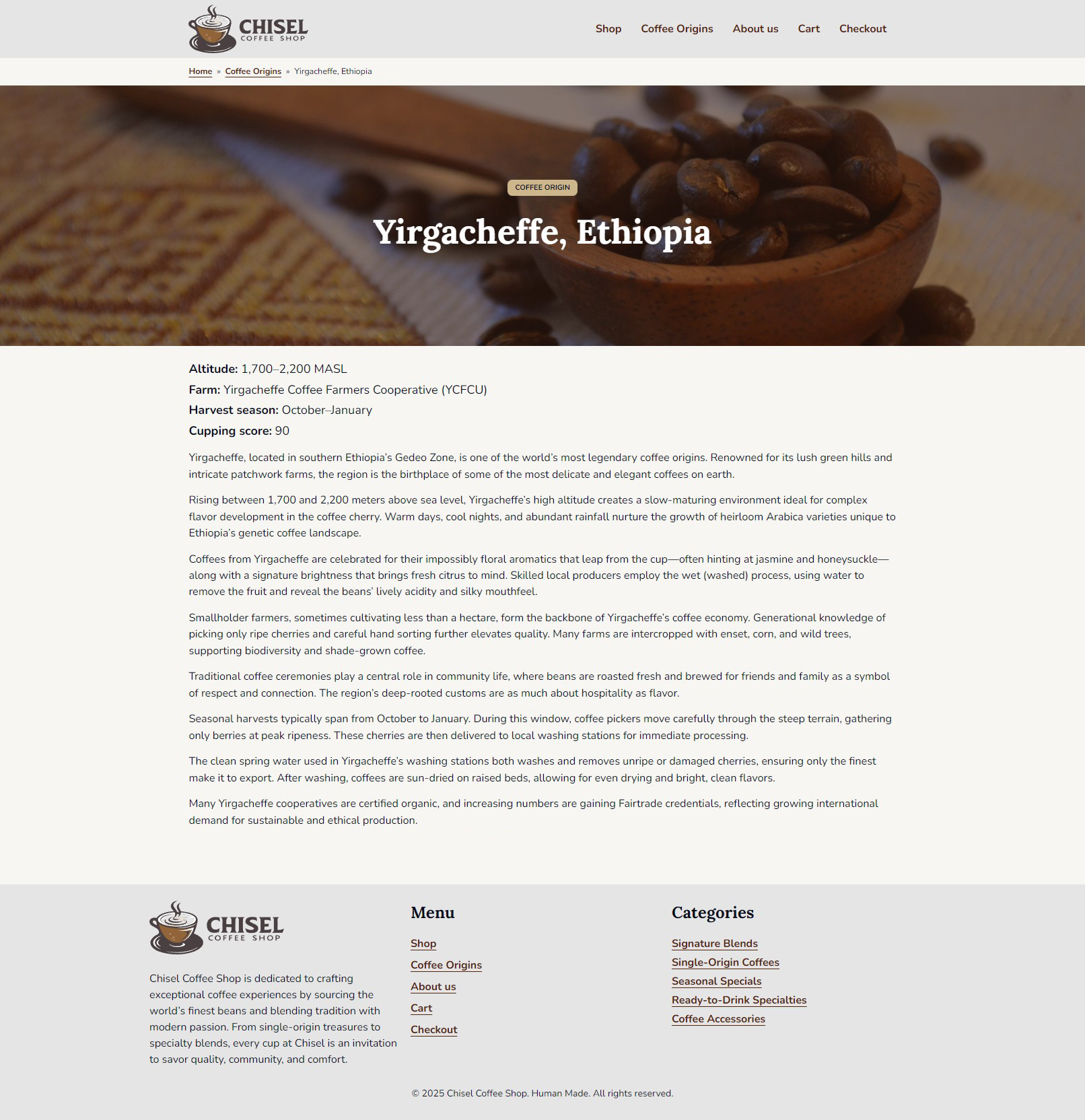
Create Coffee Origin hero section
Create: views/components/origin-hero.twig usig the native cover block for a quick implementation:
<div class="wp-block-cover alignfull c-block c-block--core c-block--cover c-origin-hero">
  {{ image }}
  <span aria-hidden="true" class="wp-block-cover__background has-primary-800-background-color has-background-dim"></span>
  <div class="wp-block-cover__inner-container is-layout-constrained wp-block-cover-is-layout-constrained">
    <div class="wp-block-group c-block c-block--core c-block--group">
      <p class="c-badge c-block c-block--core c-block--paragraph">Coffee Origin</p>
    </div>
    <h1 class="wp-block-heading has-text-align-center c-block c-block--core c-block--heading">{{ title }}</h1>
  </div>
</div>Now let’s add this to our views/single-coffee-origin.twig file:
{% extends "single.twig" %}

{% block the_title %}{% endblock %}

{% block inner_content %}
{% if post.get_thumbnail( 'full', { class: 'wp-block-cover__image-background'}) %}
  {% include "components/origin-hero.twig" with { title: post.title, image: post.get_thumbnail() } %}
{% endif %}

  {{ post.content }}
{% endblock %}Add some styles
Create: src/styles/components/_origin-hero.scss
.c-origin-hero {
  .c-block--group {
    text-align: center;
  }

  .c-badge {
    margin: 0;
  }
}Create Custom Fields
Now Let’s create some custom fields to store some additional data about Coffee Origin posts
- Custom Fields > Add New in WordPress admin.
- Title: “Coffee Origin Details”
- Add the following fields:
- Altitude
- Type: Text
- Name:
altitude
- Farm / Cooperative Name
- Type: Text
- Name:
farm
- Harvest Season
- Type: Text
- Name:
harvest_season
- Cupping Score
- Type: Range
- Name:
cupping_score - Default Value: 1
- Minimum Value: 0
- Maximum Value: 100
- Altitude
- Set location rule to Post Type is equal to Coffee Origin and Presentation Position: Side
Display Custom fields data
Now to display the custom fields values we can reference them in the single-coffee-origin.twig file by calling meta method provided by Timber, e.g
{% if post.meta('altitude') %}
  <p>Altitude: {{ post.meta('altitude') }}</p>
{% endif %}Or we can create our custom method in ChiselCoffeeOrigin class and a custom twig component for creating a nice details list:
- Create custom method
get_details()
/**
 * Prepare the origin details for twig
 *
 * @return array
 */
public function get_details(): array {
	$fields  = array(
		'altitude',
		'farm',
		'harvest_season',
		'cupping_score',
	);
	$details = array();

	foreach ( $fields as $field ) {
		$details[ $field ] = array(
			'label' => ucfirst( str_replace( '_', ' ', $field ) ),
			'value' => $this->meta( $field ),
		);
	}

	return $details;
}- Create
origin-detailstwig component inviews/components/origin-details.twig. Thanks to our class extendingTimberPostwe can call our custom method inside twig file on the post object:
<div class="c-origin-details">
  <ul class="c-origin-details__list">
    {% for item in post.get_details() %}
      <li class="c-origin-details__item">
        <strong>{{ item.label }}:</strong> {{ item.value }}
      </li>
    {% endfor %}
  </ul>
</div>- Now let’s update
single-coffee-origin.twigto display the details list:
{% extends "single.twig" %}

{% block the_title %}{% endblock %}

{% block inner_content %}
  {% if post.get_thumbnail('full', {class: 'wp-block-cover__image-background'}) %}
    {% include "components/origin-hero.twig" with {title: post.title, image: post.get_thumbnail()} %}
  {% endif %}

  {% include "components/origin-details.twig" %}

  {{ post.content }}
{% endblock %}Preview
Here’s what the Coffee Origin page should look like.